Features

    One system of work for every open deal.

    Dealboard, Deal Snapshot, MEDDIC coaching and Pipeline Health: everything Kondakta uses to move each deal forward on top of your CRM, with you approving the work.

    Model your estimated time saved — estimates, not guaranteed ROI. Explore your assumptions.

    A look under the hood

    A look inside Kondakta — Dealboard, Deal Snapshot, and the Konductor AI team showing example pipeline workflows.

    For Individual Account Executives

    Draft follow-ups. Prepare next steps. Review suggested changes. Konductor prepares; you decide.

    For Growing Sales Teams

    A connected workspace for every rep. Team-wide management and centralised controls remain planned.

    Decide faster

    Open one page. Know exactly what to do next.

    The Dealboard — Every deal. Every risk. Every next step. All current, all in one place.

    Overdue work, at-risk deals and recommended next steps in one place. Start with what matters, not a hunt through records.

    Kondakta Dealboard showing My Target, Since your last visit, weekly achievements, follow-ups, to-dos and pipeline status
    Deal drawer, deal summary with activity flow, engagement, and key contacts

    What's inside

    • AI-prioritized follow-up queue

      Overdue in red, at-risk in yellow, AI recommendations in purple.

    • Pipeline target visualization

      Live donut chart showing Closed, Pipeline, Gap, and At Risk.

    • Inline task management

      Update status, reassign, and set due dates without leaving the board.

    • Quick-create from anywhere

      Add tasks, meetings, contacts, or deals in one click.

    • Weekly achievement tracking

      Ring charts for meetings held, contacts reached, emails sent.

    • Color-coded urgency at a glance

      Scan your entire pipeline in under 60 seconds.

    • Pace-aware target card

      Attainment and deal health badges, quota-coverage donut, and week-over-week trend arrows in one panel.

    • Numbers that agree everywhere

      My Pipeline, My Target, Deals and Pipeline Health all count and scope deals identically, closed-won included.

    • This week and last week

      Toggle achievements between the current and prior week with real data behind both.

    • Priority-ordered queues

      To Do's and follow-ups are ranked by manual order, then high priority, late and at-risk.

    • Browse every deal in place

      Overflow lists scroll inline, so nothing hides behind a "+126 more" counter.
    Never lose the thread

    Pick up a deal without rebuilding the context.

    Deal Snapshot — Back from holiday. Handing to a teammate. Joining a deal mid-cycle.

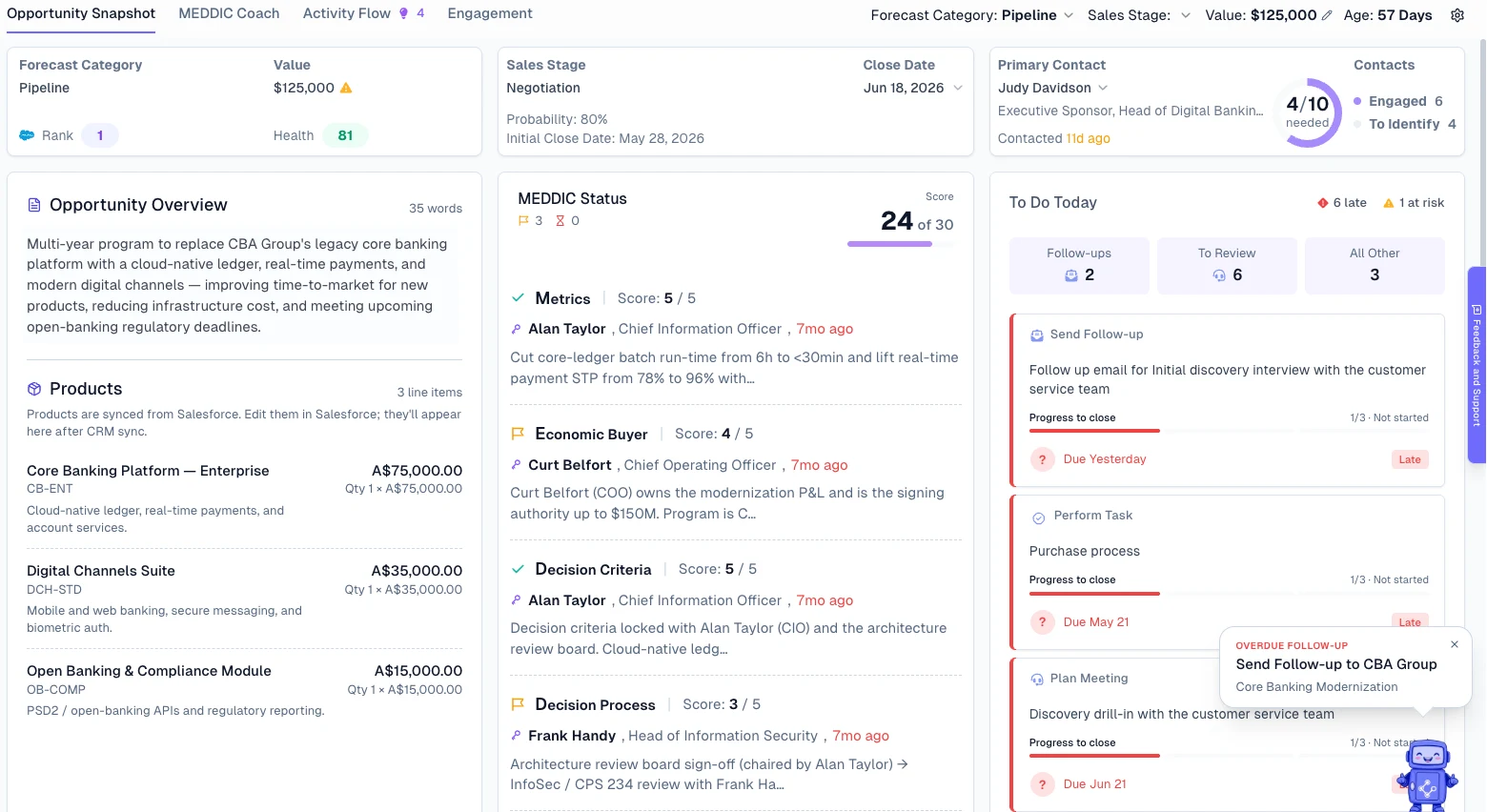
    Stakeholders, engagement, qualification gaps and next steps — one living workspace for every deal.

    Deal Snapshot, MEDDIC scoring, to-dos, and contact engagement at a glance
    Engagement page showing key contacts, engagement status, key roles coverage and last contact dates

    MEDDIC Coach: qualify with evidence, not guesswork.

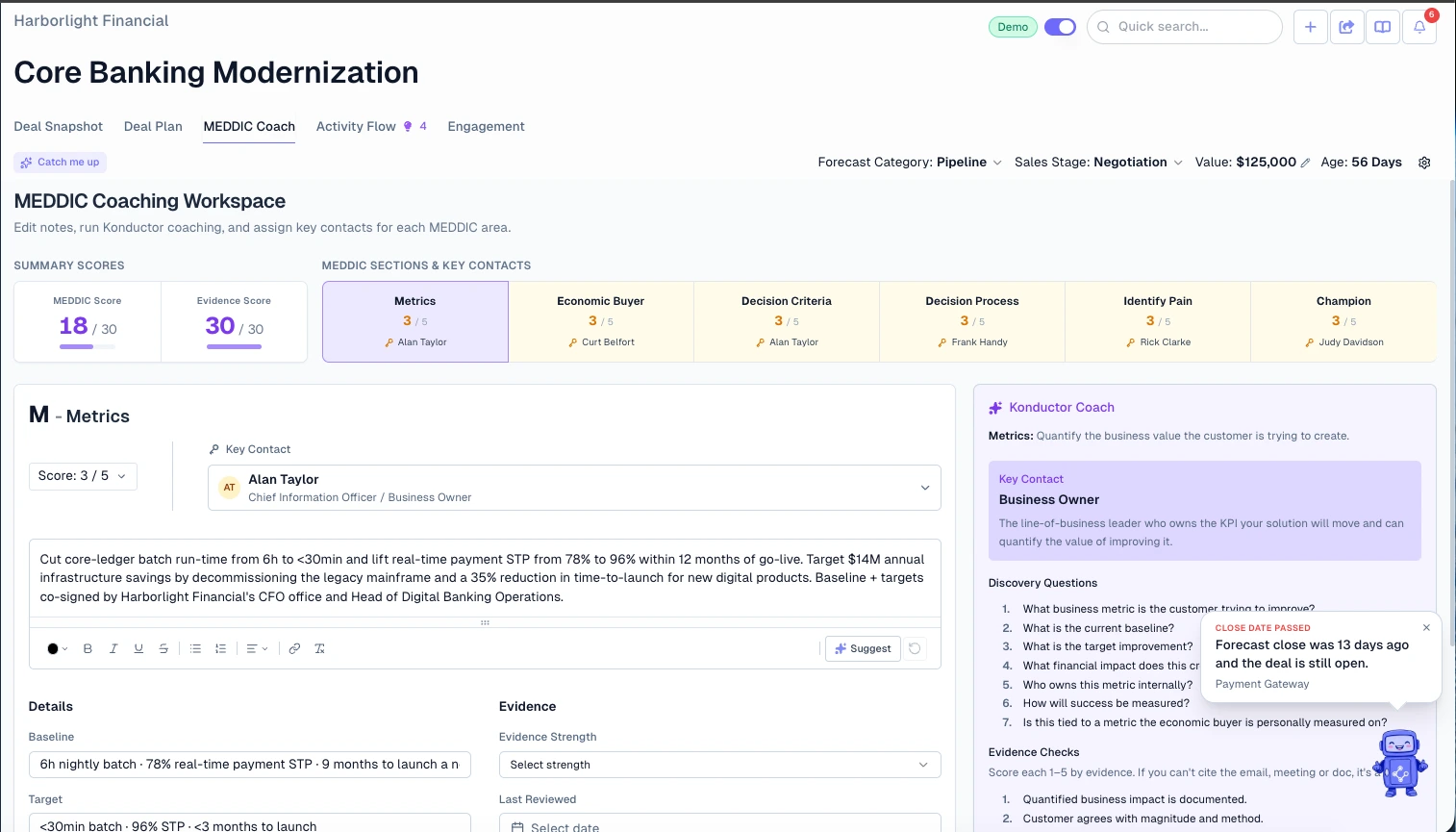
    Kondakta’s MEDDIC Coach uses your deal context to propose qualification scores, flag gaps in metrics, champions and decision criteria, and suggest discovery questions and next steps. See where the evidence is strong and what still needs checking — then review and confirm the scores yourself.

    Kondakta MEDDIC Coach demo workspace showing qualification and evidence scores, six MEDDIC pillars, a key contact, Metrics notes and Konductor discovery questions.
    MEDDIC Coaching Workspace · Example deal and scores.

    Spot qualification gaps

    Separate supporting evidence from assumptions across all six pillars.

    Coach the next conversation

    Discovery questions help you validate value, decision makers and buying criteria.

    Turn gaps into next steps

    Review suggested actions and confirm the scores that reflect your deal.

    Six pillars. Clear questions to close the gaps.

    • 1

      Metrics

      What value can you prove?

    • 2

      Economic Buyer

      Who owns the budget?

    • 3

      Decision Criteria

      What matters to the buyer?

    • 4

      Decision Process

      How will they decide?

    • 5

      Identified Pain

      What needs to change?

    • 6

      Champion

      Who backs the deal?

    Konductor proposes scores from your deal record, with evidence and discovery questions. You confirm. No call recordings or transcripts.

    Deal Plan: plan the close, not just the next step.

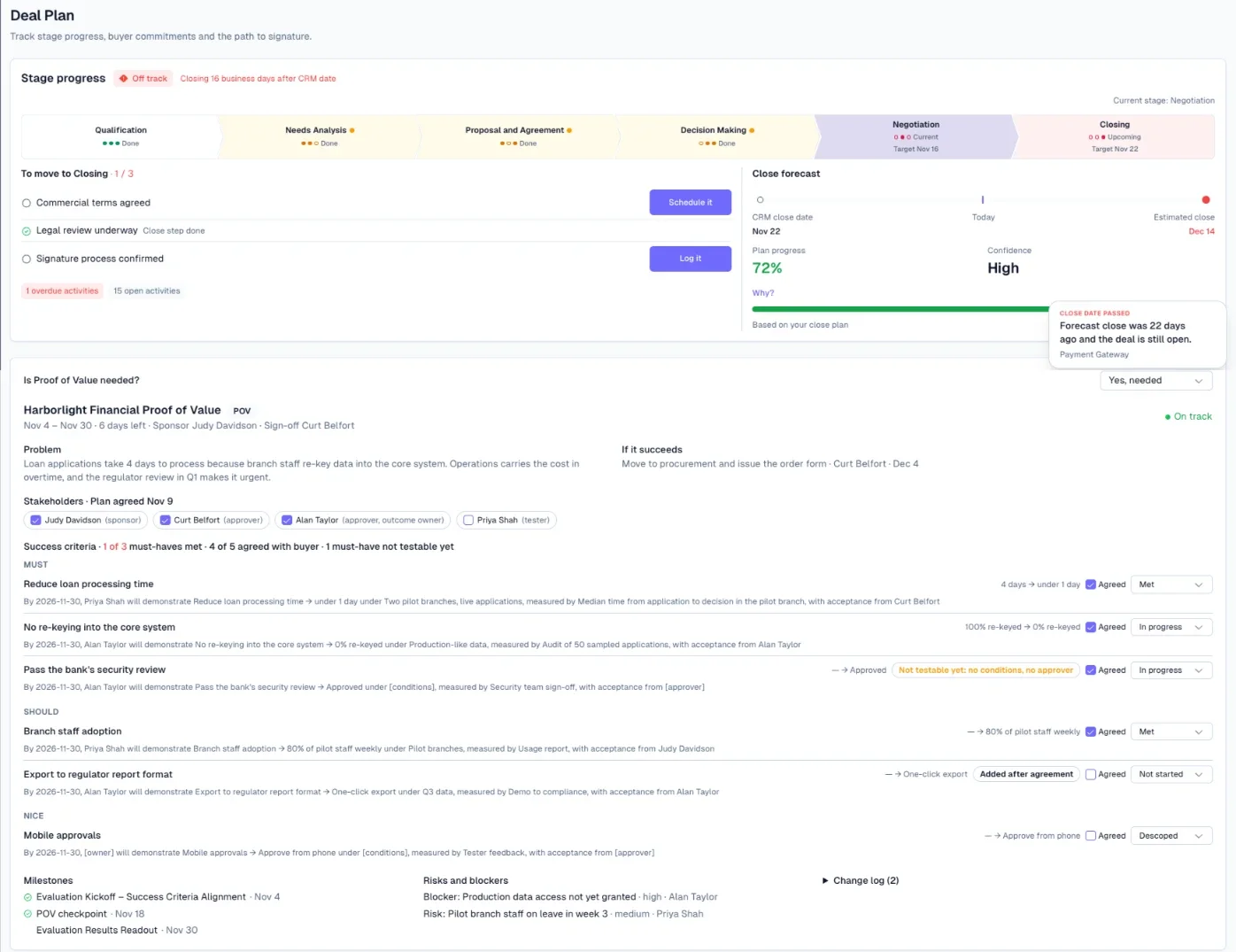
    Know exactly what it takes to close — and share it with your buyer. Deal Plan sits alongside Deal Snapshot, MEDDIC Coach, Activity Flow and Engagement on every deal, turning each stage's exit criteria, MEDDIC gaps and open work into one plan you and your buyer both work to.

    Kondakta Deal Plan showing stage progress, exit criteria to move to Closing, close forecast and a Proof of Value plan with agreed success criteria
    Deal Plan · Example deal.
    • Stage exit criteria. Sales-stage chevrons show progress against each stage's criteria, with a clear move-to-next-stage action once they're met. MEDDIC steps are included by default.

    • Recommendations you accept. Activities and follow-ups sit in one table, grouped by stage or status. Missing work appears as recommendations you accept one at a time — nothing is created on page load.

    • Close plan. A dated mutual plan to close the deal. Dates keep the day you chose, in any timezone.

    • Proof of Value plan. A structured evaluation you can choose to run when the deal needs one.

    • Branded exports from Share. Export the Close plan or Proof of Value plan as Excel, CSV or PDF, plus clean PDFs of the deal page — hidden rows included, buttons left out.

    • An evidence-based view. Fewer slipped close dates, and managers see what each stage really needs — not just a forecast number.

    Engagement: multi-thread every deal before it goes quiet.

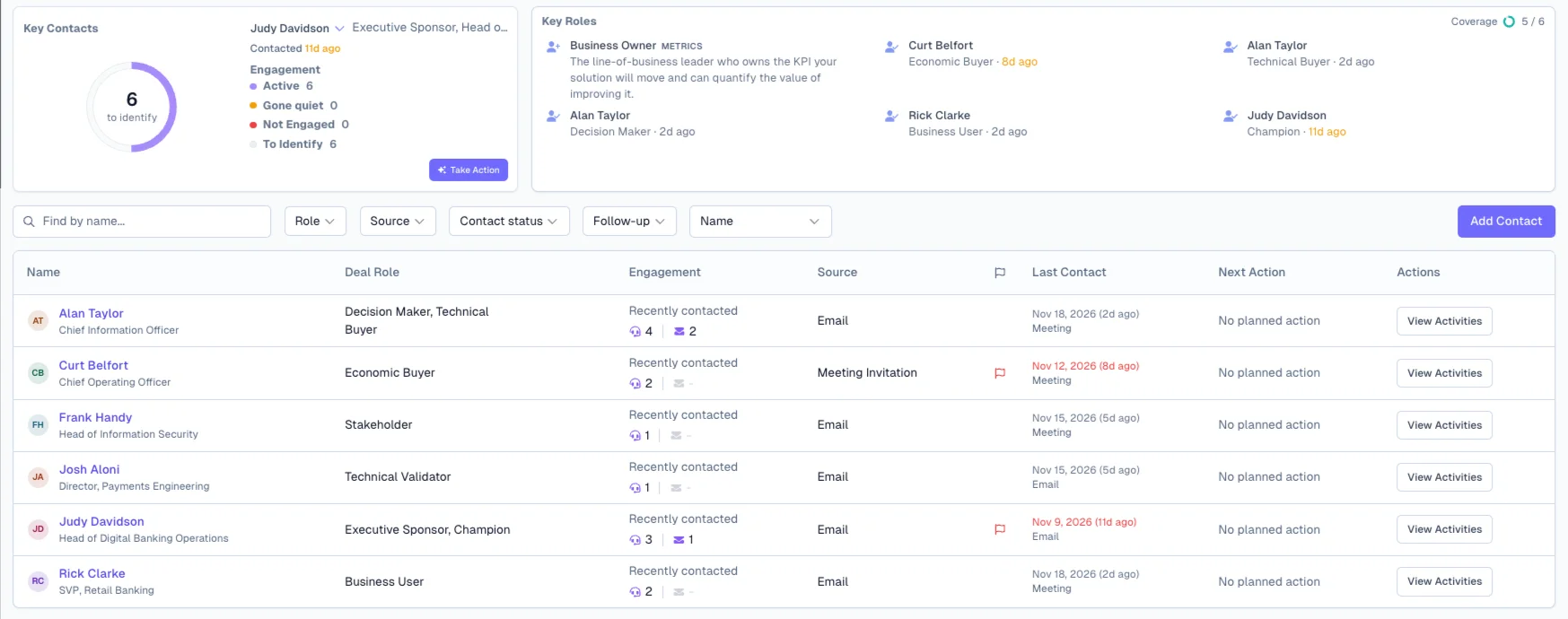
    Take Action on Key Contacts turns buying-committee gaps into work you can review. Role changes save to the deal (and to Salesforce when synced), and the Dealboard updates straight away.

    Kondakta Engagement page showing key contacts by engagement status, key roles coverage, and each contact's role, source and last contact
    Engagement · Example deal.
    • Gone quiet. A saved check-in email draft, ready for you to review and send.

    • Not engaged. A meeting draft to re-engage the contact — no invite is sent.

    • Identification. Finds likely people for missing roles from your contacts, the account's contacts and people on the deal's meetings and emails.

    What's inside

    Kondakta Deal Snapshot showing forecast category, MEDDIC qualification, buying committee contacts and next steps for an enterprise deal
    • Stakeholder engagement tracking

      See who's active, cooling, or silent on every deal.

    • AI-surfaced risk signals

      Flags stalling deals, missing stakeholders, and approaching deadlines.

    • Commit Stage + Sales Stage controls

      Update deal positioning inline in real time.

    • Drag-and-drop deal ranking

      Keep your highest-priority deals at the top.

    • Silent stakeholder warnings

      Contacts with no recent logged engagement are flagged on the deal, on thresholds you set.

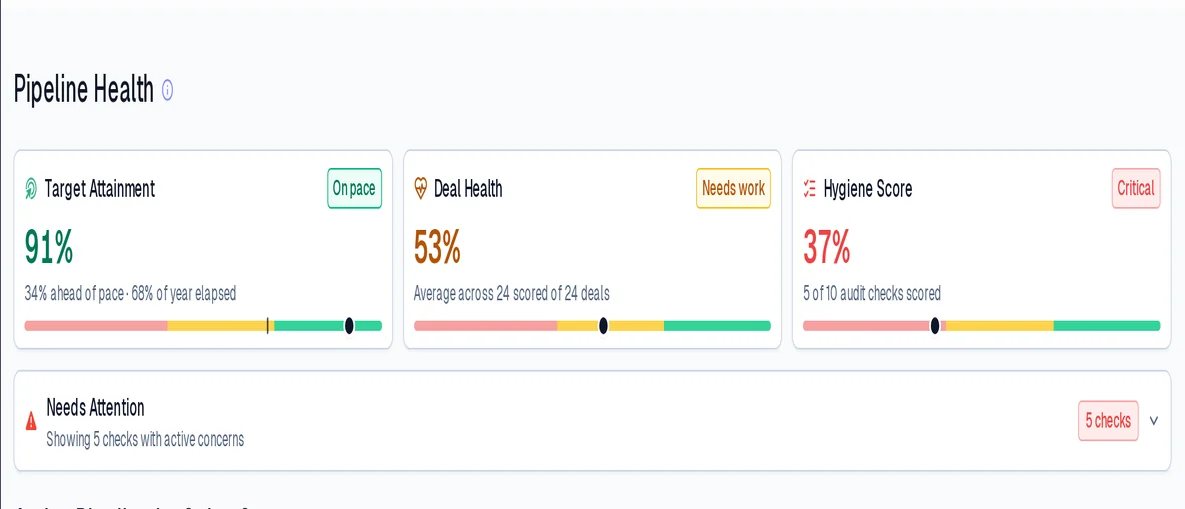
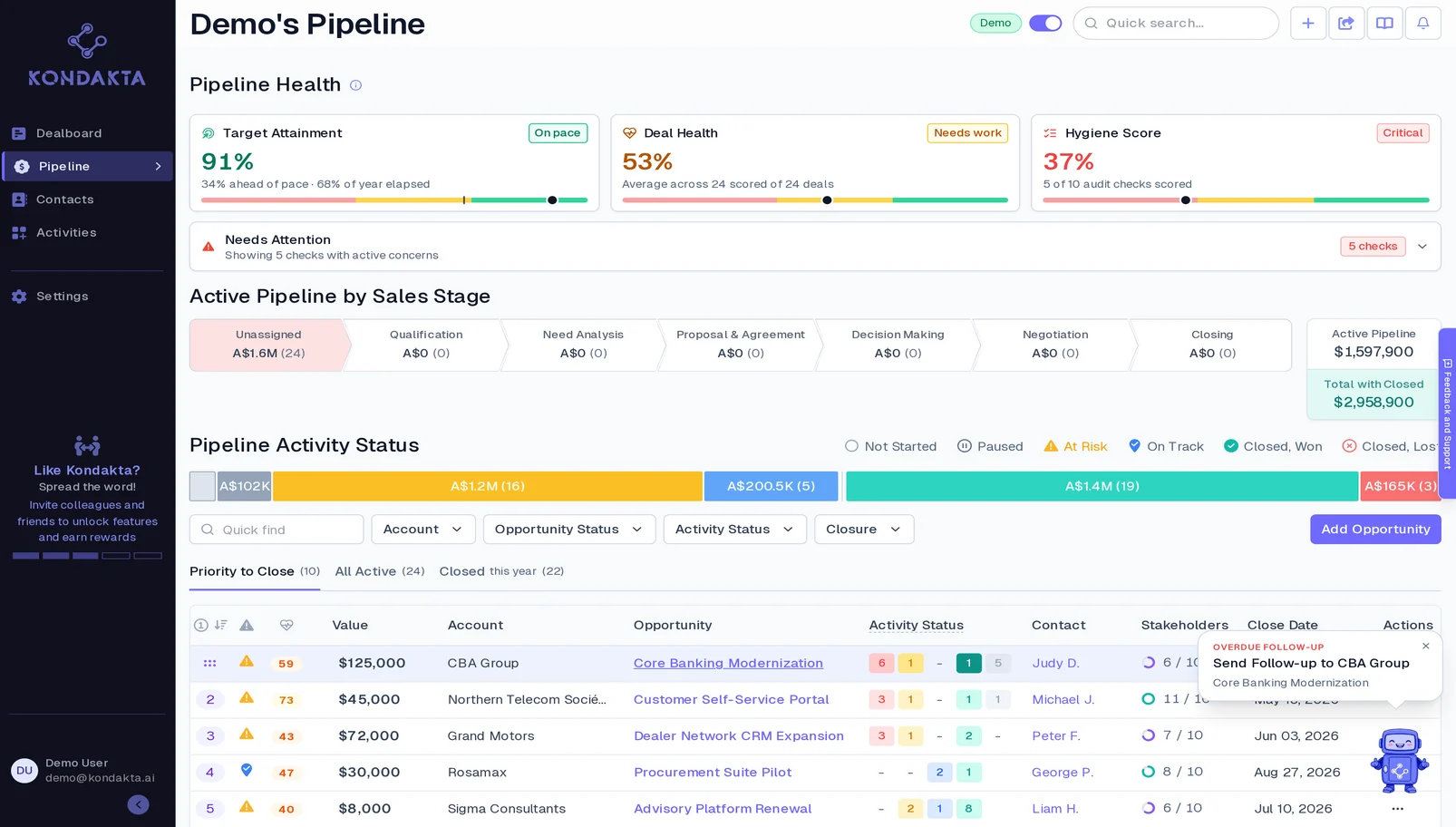
    • Pipeline Health Audit

      Every deal scored across 10 MEDDIC-aligned dimensions, with failing checks drilling down to the deals involved.

    • Deal products

      Read products from your CRM or manage local line items with per-row add, edit and delete.

    • Salesforce linkage indicators

      Forecast category and synced fields are marked, so you always know what the CRM owns.

    • Contact recommendations

      Missing stakeholders suggested from email and calendar traffic, added or suppressed with a click.

    How the work gets done

    Konductor does the work. You make the calls.

    Activity Intelligence — Konductors do the prep. You do the selling.

    Konductor uses your deal context to prepare follow-ups, highlight risks and recommend next steps. You review the work and make the calls.

    Drafts stay editable and never send themselves. Kondakta does not record, transcribe or listen to your calls, meetings or emails.

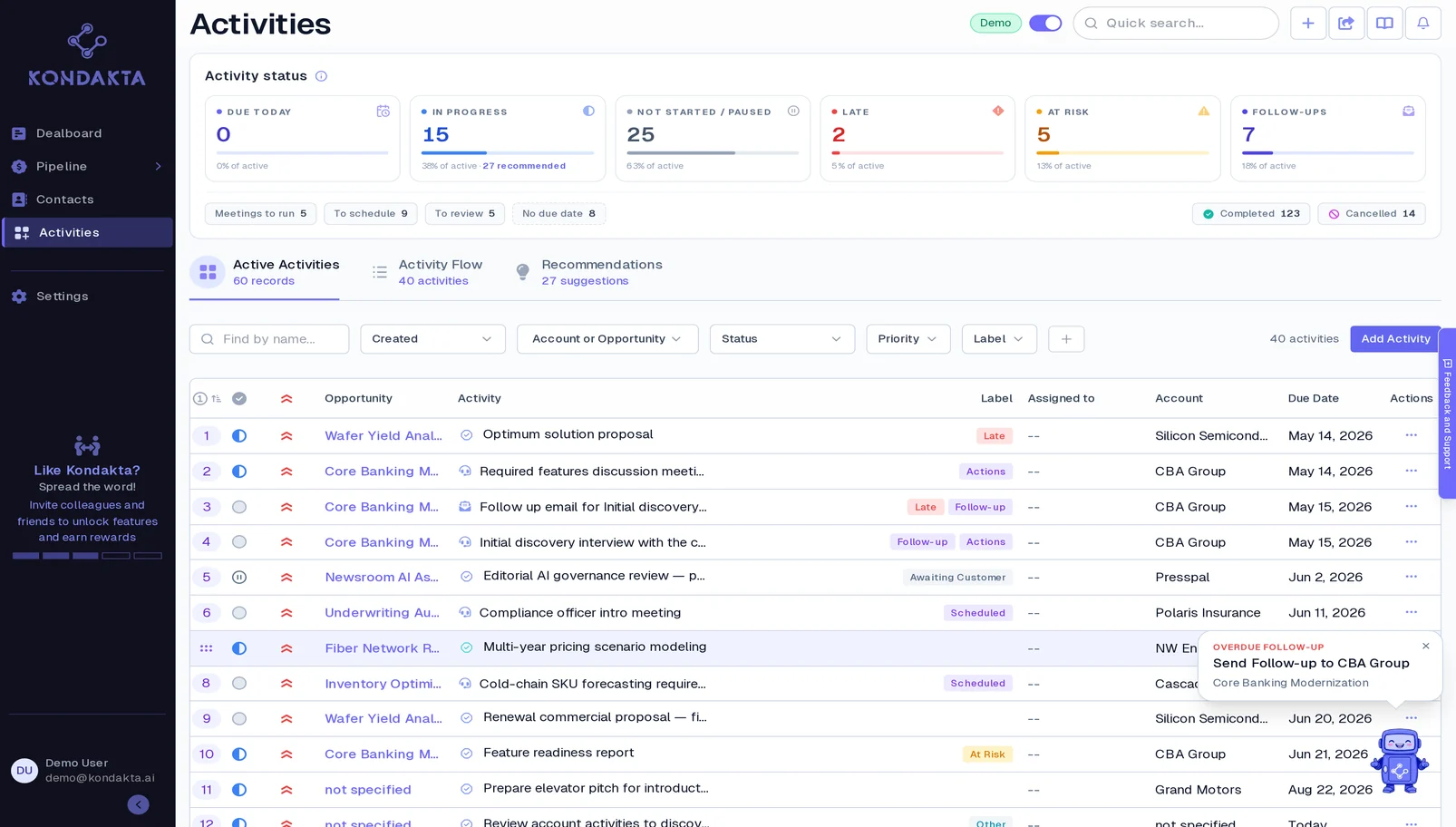
    Activities, centralized task management with status labels, priorities, and due dates
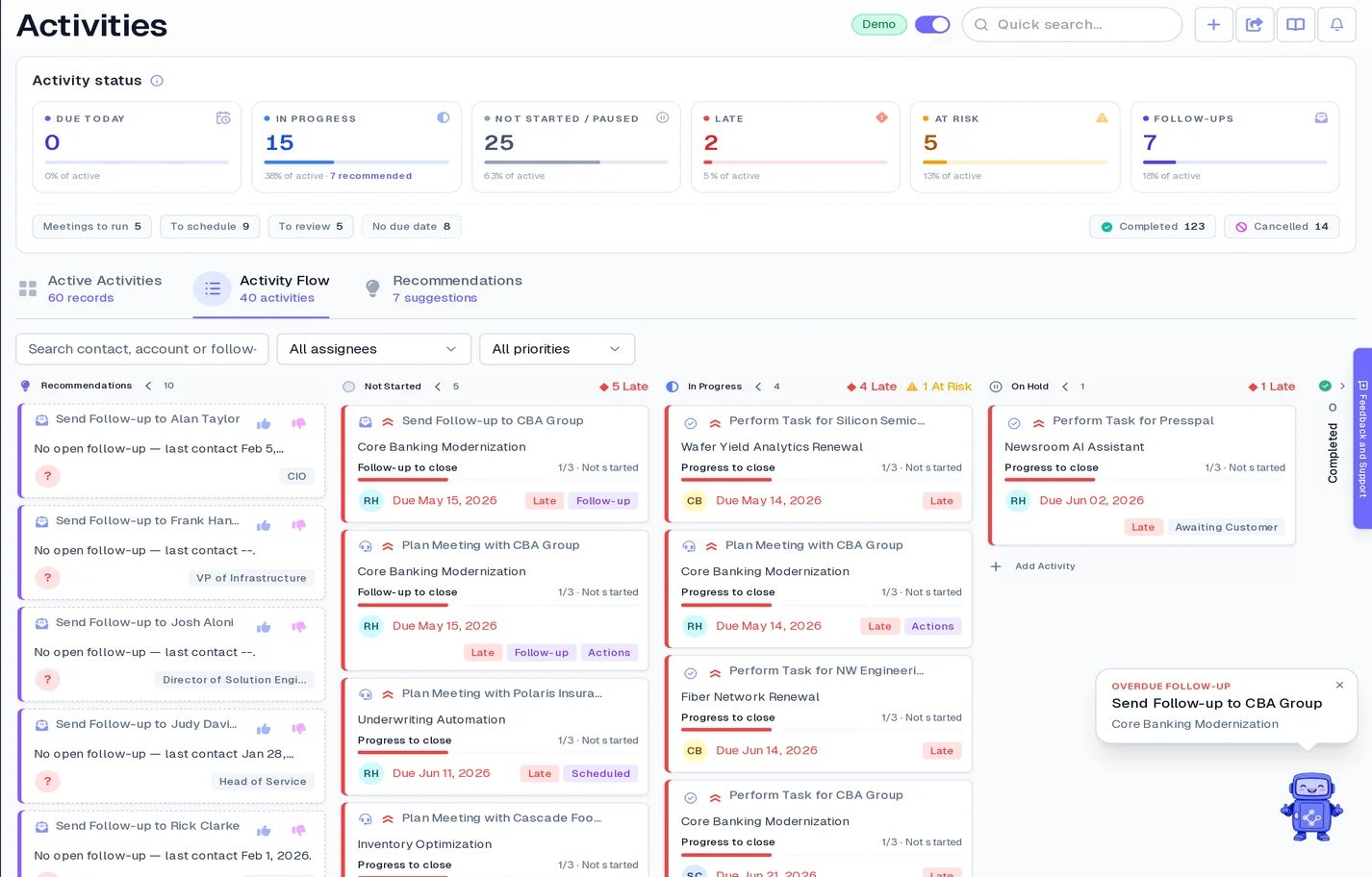
    Activity Flow, kanban board tracking recommendations, in-progress tasks, and meetings

    What's inside

    • Attachments on every email

      Add the proposal, deck or pricing sheet with the paperclip; files stay with the activity when you save and reopen it.

    • Suggest from your draft

      Konductor builds on what you've written plus the deal's linked emails, meetings and contacts — formatted, with links that work.

    • Two-step meeting scheduling

      Step 1: Konductor finds free time in the next two weeks within your office hours and holds it privately in Outlook, with attendees and a saved brief. Step 2: you review and click Send invite or Send all.

    • Invites only on your click

      Accept All prepares only the meetings it lists; meetings without attendees can't be sent. Outlook today — Google Calendar holds are not yet supported.

    • Personalized follow-up drafting

      Drafted from deal context, stakeholder roles and your logged next steps — you review and send.

    • Nothing sends itself

      Every draft, task and CRM update is surfaced for your approval first.

    • Next-best action recommendations

      By deal stage, from Qualification through Closing.

    • Stalled deal detection

      Flags deals that have gone quiet before momentum is lost.

    • Quiet contact warnings

      Notifications when a key contact has no recent logged engagement, on thresholds you set.

    • Account briefings on demand

      Ask Konductor to brief you on the account and highlight deals, contacts and coverage gaps.

    • Stage-triggered activity suggestions

      When a deal advances, Konductor recommends the right next plays.

    • One-click recommendation conversion

      Review a suggestion and accept it as a tracked activity; inspect the saved receipt and outcome.

    • Accept a whole remediation set

      Review selected-record scope before accepting a batch plan; protected changes need explicit confirmation.

    • Drag-and-drop activity priority

      Activities inherit deal priority and can be reordered by hand.

    • Progress to close on every card

      Each activity shows how far the deal has moved toward closing, colour-coded by status and urgency.

    • Filters and full-fidelity exports

      Filter by created date from Today to Last Quarter; choose selected, filtered or all scopes for To do exports, including outstanding recommendations. Completed Activities PDF/CSV exports include cancellation choices.

    • Completed work stays visible

      Review completed and cancelled work, drafts and Konductor outcomes in Activity History.

    • Calendar meeting sync

      Matched meetings import as activities automatically, with a guided reconnect flow if access lapses.

    The Kondakta workflow

    Observe. Infer. Recommend. Approve.

    Your AI assistant team prepares the work. You stay in control.

    1. Your permitted context

      1Observe

      Read deal records, logged activities, stakeholder engagement and connected calendar context.

      Deals · Contacts · Activities

    2. Your Konductors

      2Infer

      Spot quiet contacts, overdue work, close-date risks and gaps in MEDDIC evidence.

      Risks · Gaps · Priorities

    3. Work ready for review

      3Recommend

      Prepare a drafted follow-up, meeting brief or scoped activity plan with a clear next step.

      Drafts · Briefs · Plans

    4. You make the call

      4Approve

      Review and edit the work. Confirm protected changes within your permissions; drafts never send themselves.

      Review · Edit · Confirm

    Review saved outcomes. Unfinished work stays visible. Undo where supported.

    Back to the next review

    Works with your products and platforms

    No CRM? Use Kondakta on its own or import a CSV/Excel export. Connection scope and availability vary; a spreadsheet import is not a native connection.

    How it works

    One platform. Every deal. Always moving.

    Step 1

    See everything

    Dealboard gives you a single real-time view of every deal, every risk, every follow-up, and every next step, color-coded and prioritized before you even start your day.

    Step 2

    Know what matters

    Deal Snapshot combines stakeholder mapping, MEDDIC qualification scoring, and engagement tracking to surface exactly where each deal is strong, where it's weak, and what needs your attention.

    Step 3

    Execute without the grind

    Konductor recommends next actions and prepares scoped batch plans. Review the requested work, confirm protected changes and inspect saved outcomes, activity receipts, progress and partial failures.

    Konductor in action

    Not a chatbot. Konductor works inside a system that knows every deal.

    Review scoped plans, confirm protected changes and inspect saved outcomes. Undo is available where supported; unfinished work stays visible.

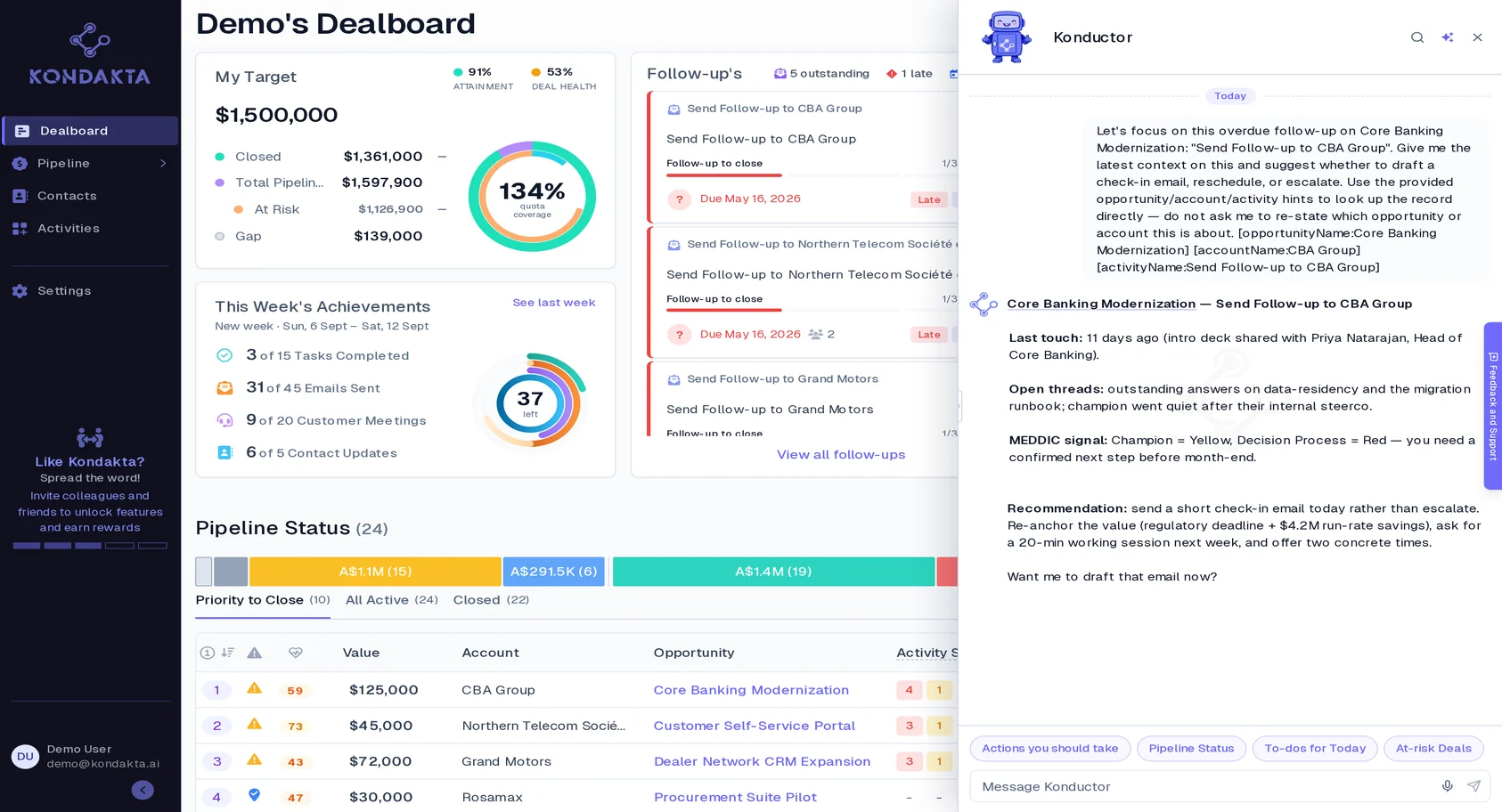
    Kondakta Dealboard with Konductor panel open, surfacing overdue follow-ups, at-risk deals, and MEDDIC recommendations across the active pipeline
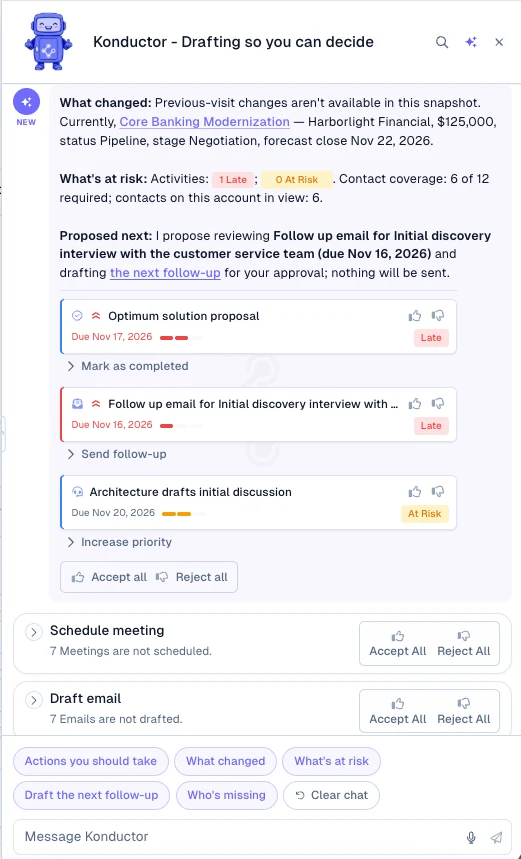
    Konductor panel summarising what changed and what's at risk on a deal, proposing late and at-risk activities to accept or reject, with nothing sent without approval

    Your core workspace, improved

    Keep your deals, accounts, contacts and activities connected in one workspace.

    Review the work, then the result

    • Review scoped plans
    • Confirm protected changes
    • Reopen saved outcomes; retry unfinished work

    Prepare without sending

    • Attach files to email drafts
    • Hold meeting slots privately in Outlook
    • Invites send only when you approve

    Spot gaps before close

    • Evidence-led qualification
    • Missing roles and quiet contacts
    • Close-date warnings

    Keep records useful

    • Clean up duplicate accounts and contacts
    • See which account each contact belongs to
    • Preview what will be removed before you confirm

    Work comfortably, anywhere

    • Full Deal Snapshot on phone
    • Consistent activity filters
    • Browser access, not an offline app

    Review activities without losing context

    • Reopen editable drafts
    • Review completed and cancelled work
    • Export PDF and CSV

    See estimated impact

    • Saved completed work, not alerts
    • Weekly summary PDF
    • Estimated minutes, not measured time

    Reviewed 20 November 2026. Explore Release History.

    Works with your products and platforms...

    Kondakta works alongside your existing CRM, not instead of it. Salesforce supports explicit permission-scoped deal/contact updates and supported activity operations; automatic two-way activity sync is a conditional invite reward. HubSpot, Pipedrive and Dynamics 365 direct import connectors are live in Beta, without write-back; other CRM exports can be imported as spreadsheets. And you don't need a CRM at all to start — a spreadsheet is enough.

    Messaging & meetings

    • Microsoft Outlook integration

      Microsoft Outlook

      Available now

      Existing calendar and mailbox integration, subject to your connection and permissions.

    • Slack integration

      Slack

      Beta · Available now

      Existing Slack connection. Specific channel alerts and nudges still require confirmation.

    • Zoom integration

      Zoom

      Beta · Coming soon

      Planned meeting transcripts and Team Chat updates.

    • Microsoft Teams integration

      Microsoft Teams

      Beta · Available now

      Notification posts with approve/dismiss links are live in Beta. Meeting and transcript integration is not confirmed.

    • Google Meet integration

      Google Meet

      Beta · Coming soon

      Planned meeting transcripts and Google Chat updates.

    • Gmail integration

      Gmail

      Beta · Coming soon

      Planned personal email and calendar connection.

    Import from your CRM

    • Salesforce integration

      Salesforce

      Available now

      1-way and 2-way integration and synchronization supported for all accounts, deals, contacts and teams.

    • HubSpot integration

      HubSpot

      Beta · Available now

      1-way and 2-way integration and synchronization supported for all accounts, deals, contacts and teams.

    • Pipedrive integration

      Pipedrive

      Beta · Available now

      1-way and 2-way integration and synchronization supported for all accounts, deals, contacts and teams.

    • Microsoft Dynamics 365 integration

      Microsoft Dynamics 365

      Beta · Available now

      1-way and 2-way integration and synchronization supported for all accounts, deals, contacts and teams.

    Agent integrations (MCP)

    • Claude integration

      Claude

      Available now

      Opt-in, scoped access. Not unrestricted write access.

    • ChatGPT integration

      ChatGPT

      Available now

      Opt-in, scoped access. Not unrestricted write access.

    • Cursor integration

      Cursor

      Available now

      Opt-in, scoped access. Not unrestricted write access.

    CRM & business-system data imports

    • Zoho integration

      Zoho

      Data import · CSV/Excel

      Easily import data using predefined templates for Zoho.

    • Close integration

      Close

      Data import · CSV/Excel

      Easily import data using predefined templates for Close.

    • NetSuite integration

      NetSuite

      Data import · CSV/Excel

      Easily import data using predefined templates for NetSuite.

    • Freshworks integration

      Freshworks

      Data import · CSV/Excel

      Easily import data using predefined templates for Freshworks.

    • SAP integration

      SAP

      Data import · CSV/Excel

      Easily import data using predefined templates for SAP.

    • ServiceNow integration

      ServiceNow

      Data import · CSV/Excel

      Easily import data using predefined templates for ServiceNow.

    • Oracle integration

      Oracle

      Data import · CSV/Excel

      Easily import data using predefined templates for Oracle.

    • CSV/Excel

      Data import · CSV/Excel

      Easily import data using predefined templates for CSV/Excel.

    Get Started

    Ready to close more and stress less?

    Bring your pipeline, prioritise your day and put Konductor to work on drafted follow-ups, evidence-led coaching and next steps you control.